
01 Journal
The stories
Open FOI like any other app. The journal is the heart — dated, not a feed.

FOI on your device
No store. No extra app. The journal becomes a window of its own.
Chrome installs from the button. iPhone: Share → Add to Home Screen.



Learning by making
From Instagram
Already in Safari? Begin at 03.
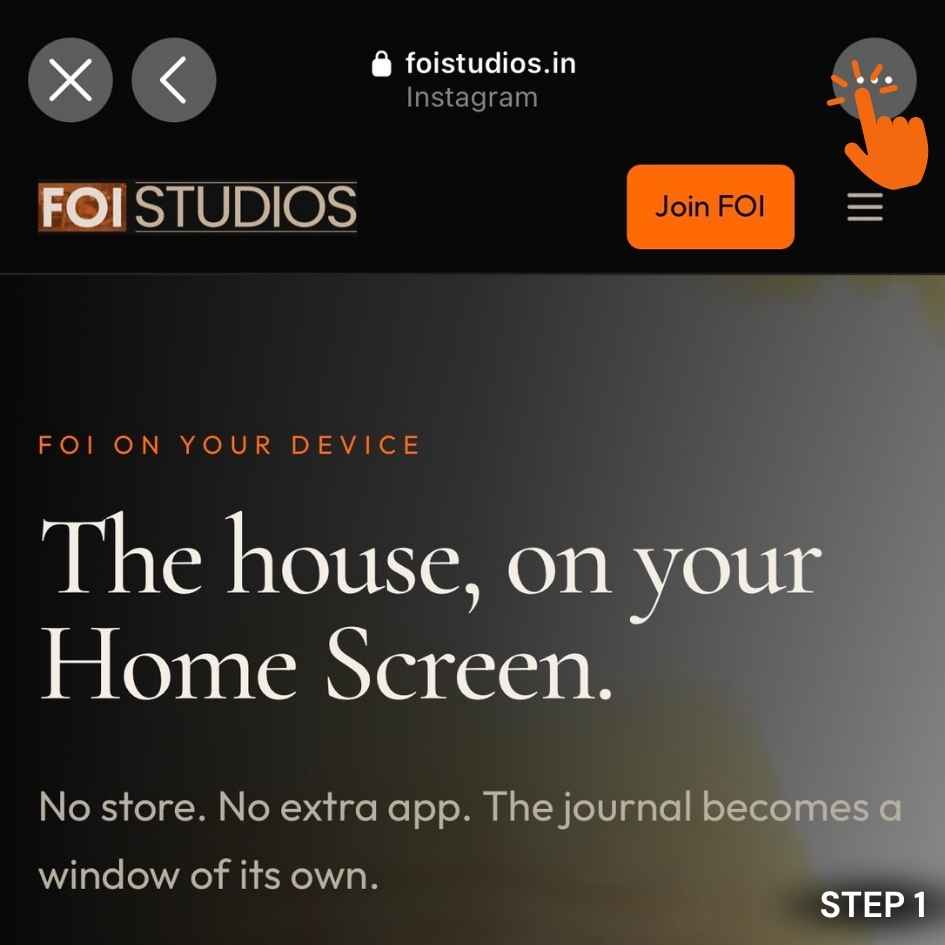
Step 01 · The three dots
You are still inside Instagram. Tap ⋯ at the top right.
What you keep
01 Journal
Open FOI like any other app. The journal is the heart — dated, not a feed.

02 Stills
Pictures you have already seen wait on the device if the line drops. Sign-in never does.

03 Dock
Your Home Screen, your dock, your own window. No store listing. No extra download.
How to put it on the glass
iPhone & iPad
Open foistudios.in in Safari. Tap Share. Choose Add to Home Screen. Apple does not allow a store-style install — this is the door.
Android
Open the house in Chrome. Tap Download our app above, or the install icon in the address bar. Confirm. The falcon sits with your other apps.
Computer
Chrome or Edge: install from the address bar, or the button on this page. FOI opens without the browser chrome.
Journal alerts
A quiet system alert on this device. Not email. Not a feed. You can turn it off in Account or here.
A system alert when a journal story is first published. Sign-in is not required. You can turn this off any time.
Already a member? Enter the journal. New to the house? Join FOI — free.